A photorealistic preview gives customers immediate confidence when personalizing a product. They can see exactly how their design, name, or photo will look on the final product, eliminating doubt and uncertainty. This reduces the likelihood of errors, lowers returns, and speeds up the purchase decision. The more realistic the preview, the stronger the emotional connection with the product and the higher the conversion rate.
This article provides a brief introduction to this important functionality. Please note that this is only an introduction covering the basics.
Example 1: preview greeting card
The image below shows the dynamically generated preview of a greeting card. Visitors/customers can choose from multiple front and inside designs and can customize colors, texts, and objects. The preview provides an immediate photorealistic representation of the final product to be ordered. It is so realistic that the chance of conversion is maximized.
De Preview in Printess
Onderstaande schermafbeelding toont de krachtige Design Backend van de Printess omgeving. Vanuit deze omgeving worden nieuwe templates aangemaakt en kunnen bestaande templates worden aangepast. Een van de grote voordelen van Printess is dat er een scheiding is tussen de volgende type documenten:
- Primair document:
Het primaire document is het object c.q. document wat de bezoeker/klant vanuit de Online Editor gebruikt om het betreffende artikel te personaliseren. Per template en per primair document kan exact worden bepaald wat de bezoeker krijgt te zien en welke functies beschikbaar zijn.
- Preview:
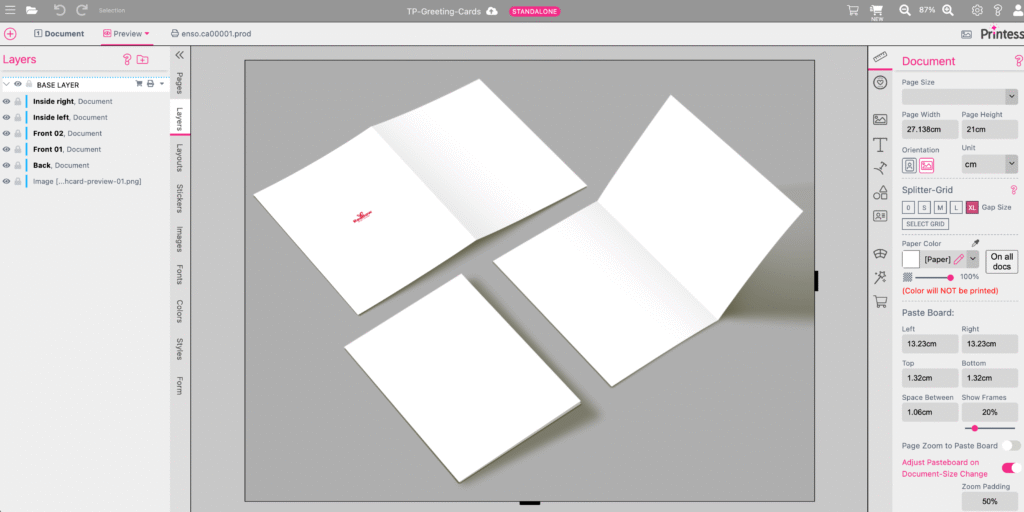
The Preview, see image below, is a separate display that can be designed from the backend. The primary document, consisting of one or more pages, is positioned in this preview in the desired manner.
- Production:
The production document is also a completely separate document that can be configured exactly as desired. For example, the exact dimensions and additional information that needs to be included in the output, such as article and/or order details.
The fact that these three documents—primary document, preview, and production—are separate gives each template a particularly high degree of flexibility. Each type of document can be compiled entirely according to your own preferences.
Positioning the primary document
Printess beschikt over een functionaliteit genaamd ‘Subdocumenten’. Subdocumenten bied een bijzonder breed palet aan krachtige mogelijkheden. Zo kan deze functionaliteit worden gebruikt om content op meerdere locaties te laten terugkomen, bijvoorbeeld op voor- en achterzijde van een artikel, om meerdere verschillende output documenten te genereren en -in deze- om een preview te genereren.
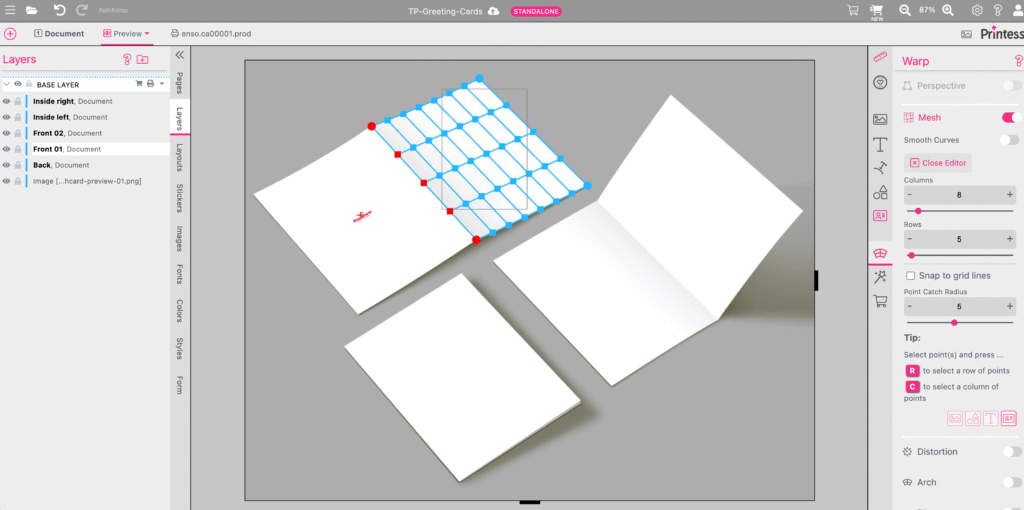
In the case of the greeting card, the primary document consists of four pages: front, inside left, inside right, and back. Each side can be used as a subdocument. In the image below, page 1 of the primary document, which is the front of the greeting card, is positioned on the front of the preview.
The subdocument can then be placed in perspective and, with the aid of a grid, the subdocument, in this case the front of the greeting card, can be positioned exactly. This grid can consist of fewer or more points as required in order to position the preview exactly.
Every time the visitor/customer makes a change to the design—in the primary document—such as changing a photo, text, font, and/or color, the preview is automatically 100% in sync with each change. Because it is a subdocument, the document positioned on the preview is in fact the same document that the visitor is working on.
Example 2: Pillows
De bij Printess standaard meegeleverde template voor een kussen, is eveneens een goed voorbeeld van een sterke fotorealistische preview. Onderstaand het Preview Document in de Printess Design Backend.
No fewer than 40 points were used horizontally and vertically to position the preview as realistically as possible. The result is shown below, where you can clearly see that the preview 'organically' follows the folds in the cushion at the bottom left.
As mentioned in the introduction, this is just the tip of the iceberg in terms of available functionality and possibilities for creating a strong preview.